For researchers · writers · analysts · the document-drowned
Your documents, as a living universe.
Drop in PDFs, Word files, spreadsheets, slides, notes, even photos of text. VisiDocsverse hangs every document in 3D space — related ideas pull together with real gravity, and whatever you're reading sits at the center while everything it connects to orbits around it. Stop hunting through folders. Navigate by meaning.
🔒 Offline-first — files never leave your PC🪟 Windows app🎁 21-day free trial — no card🔁 $4/month subscription
Billed twice a year ($24 every 6 months) · Cancel anytime · Your vault stays readable on your machine, always.
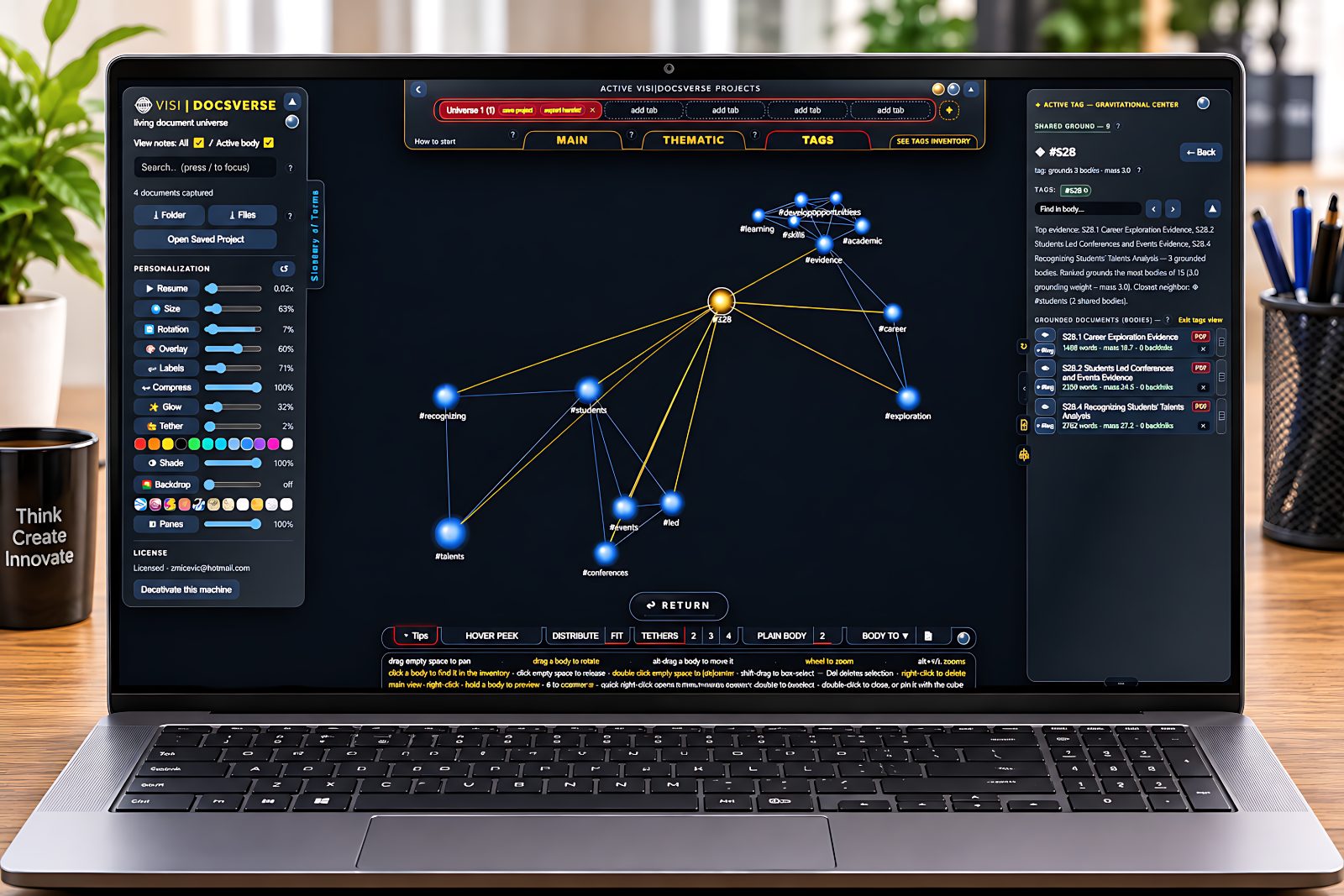
The whole workspace on one screen — panes, universe, reader
WINDOWS APP ONLY · MAC USERS — WE HEAR YOU — COMING SOON · WINDOWS APP ONLY · MAC USERS — WE HEAR YOU — COMING SOON · WINDOWS APP ONLY · MAC USERS — WE HEAR YOU — COMING SOON · WINDOWS APP ONLY · MAC USERS — WE HEAR YOU — COMING SOON · WINDOWS APP ONLY · MAC USERS — WE HEAR YOU — COMING SOON · WINDOWS APP ONLY · MAC USERS — WE HEAR YOU — COMING SOON ·
Built for people buried in documents — theses, cases, reports, scripts, lore bibles:🎓 Students📝 Writers⚖️ Lawyers📊 Analysts🎲 Worldbuilders
Real app, real motion
Watch gravity work.
Captured live from the app — no mockups, no animation. Documents orbit, tethers glow, search spotlights the matches.
From intake to orbit. Drop a folder — 12 documents captured, parsed and seated in the universe. This is where every constellation starts: the intake panel, then the slow gyre. Open full view →
Easy-locate documents. Click on a body (document) and see where it is the reader pane inventory. Open full view →
Click to read. Touch any body and the reader docks beside it — full text, tags and notes riding above — while everything it connects to stays in view. Open full view →
Context stays tethered. The open document keeps its glowing lines to every related body. Follow a tether to hop the neighborhood without losing your place. Open full view →
Why it hits different
Folders show names. VisiDocsverse shows relationships.
A folder can't tell you that page 14 of one PDF answers chapter 3 of another. Gravity can. Documents that share tags, topics and references physically pull toward each other — clusters form on their own, outliers drift alone, and the structure of your thinking becomes something you can see.
◉ REAL APP
🔍
Keyword search through documents
Pictured: a live search for “leadership” — the word lights up gold at every hit inside the open document, while the universe, its tethers and the minimap stay exactly where they were. Full-text search across every file at once; walk hit to hit without ever leaving the map.
Pictured: the corpus re-webbed around ideas — glowing theme bodies (“Outcomes”, “Health”) ringed by their member documents and tethered to each other. One click re-webs the whole corpus this way — click a theme for its members in the project-tag panel, drill into any one.
Pictured: this library's real tag web — glowing label-bodies joined wherever two labels share documents, with the ALL TAGS panel open over all 37 pills. Browse, merge and rename pills; the map rewires itself. Click a tag for its member documents in the side panel.
Pictured: the notes composer for a document — “Write a note about this document…”, Save, and “+ Add selection from document” — inside the panel listing the tag's member documents, while the gold sun holds the active body. Sticky square on the canvas, reader button and this panel are the same list.
Drag a folder — or 60 files at once. VisiDocsverse reads text, images inside documents, even photographed pages, computes mass and tags, and seats every body in orbit. Your first sun crowns itself.
2
Fly the gravity
Drag to orbit, scroll to dive, double-click to recenter. Related bodies glow and tether when you touch one. Switch MAIN / THEMATIC / TAGS to see documents, ideas, or labels.
3
Read at the center
Click any body — it becomes the sun and the reader opens on it, ringed by everything it connects to. Pin passages to notes, merge tags, follow backlinks. Off-click to release.
0file formats read natively
0universe views (docs · ideas · labels)
0files per drag-drop batch
0% offline — your files stay yours
One corpus, three brains
See the same work three ways.
Every view is live physics, not a static chart. Pick one — the same documents rearrange around what you asked.
Main: every document as itself
Each file is a body sized by its mass. Shared tags and references become glowing tethers, so related work clusters on its own and loners drift to the rim where they belong.
Click any body → it glides home as the sun
Gold halo = what you're reading; gold lines = its shared ground
Box-select, copy between canvases, quantum twins stay in lockstep
🟡 sun = active document🔵 body = document〰️ tether = shared ground
Hands on
Fly a pocket universe.
A real miniature of the app's physics — twelve documents from a sample thesis, tethered by what they share. Click any body to read it at the center; follow its tethers to hop. Nothing leaves your browser.
click a body →
12 documents in orbit
Pick any glowing body to dock the reader on it — its tethers light up gold and everything it connects to is one click away.
Private by architecture
Your files never leave your machine.
No cloud to breach, no upload queue, no “AI training on your thesis.” The vault lives in your PC, every format engine is vendored inside the app, and OCR runs locally. Unplug the internet — everything still works.
✓ All parsing (PDF, Word, Excel, PowerPoint, OCR) runs inside the app — zero network calls for your content.
✓ License check phones home at most once a week; a 7-day grace keeps you working offline.
✓ Backups are files you hold. Restore on any machine with your key.
The only network traffic: license activation, weekly check, and update notices. Never your documents.
Not AI — on purpose
Built for people who won't outsource their thinking.
VisiDocsverse contains no generative AI, no chatbot, no summarizer. Nothing is paraphrased, guessed, or “helpfully” rewritten. The app maps what your documents actually share — tags, topics, references — with deterministic rules, so the same files always produce the same universe. You read. You connect. You decide. The software just makes the relationships visible so your judgment gets sharper instead of replaced.
🧭 What VisiDocsverse does instead
Shows every source in place. Each document stays whole, readable, and clickable at the center of its own neighborhood.
Links you can verify. Every tether is shared ground you can open — a tag, a topic, a reference — not a generated claim.
Same files → same map, every time. Deterministic physics. Reopen tomorrow and the constellation is where you left it.
Thinking aid, not answer machine. It organizes the evidence; the interpretation stays yours.
⚠️ Why AI is an unreliable partner for documents
Ask twice, get two different answers. The same set of documents can produce a different synthesis on every run — which version do you cite?
Sources flattened into a paragraph. Summaries bury the document you needed to actually read, and confident phrasing hides the gaps.
Citations you still have to check. A fluent answer with a wrong page number costs more time than finding the passage yourself.
Your files leave the room. Cloud models upload, retain, or train on what you paste — a non-starter for theses, cases, and client work.
What matters
✓ VisiDocsverse
Typical AI assistant
Same documents → same result, every timeDeterminism you can build on
✓ Yes — deterministic map & physics
✗ No — answers vary run to run
Every claim stays attached to its documentNothing summarized away
✓ Yes — full text one click away
~ Partial — buried in a summary
Links you can click and verifyTether = shared tag, topic, or reference
✓ Yes — open the shared ground itself
✗ Risky — citations can hallucinate
Works fully offlinePlane, archive, fieldwork
✓ Yes — 100% local
✗ No — needs the cloud
Your files never train a modelPrivate by architecture
✓ Never — stays on your PC
✗ Uploaded, retained, or trained on
Who does the interpreting?The part that makes it your work
✓ You do — the tool sharpens judgment
✗ It does — you proofread it
What that means for you
If your work has to be yours — defensible, citable, original — a map beats a mouthpiece.
🎓
Researchers
Literature reviews without drift. The same corpus maps the same way for you, your advisor, and your examiner — every connection traceable to a passage.
📝
Writers
Keep plots, arguments, and sources consistent. See what each chapter actually connects to instead of asking a chatbot what you wrote.
⚖️
Lawyers
Same exhibits → same map. No hallucinated clause, no invented citation — just exhibits, tethered by what they share, ready for brief.
📊
Analysts
Reports you can audit. Follow any cluster back to its files and show your work — “the model said so” never appears in the chain.
🎲
Worldbuilders
Lore bibles that stay coherent. Characters, places, and timelines pull together by what they share, so contradictions surface visually.
📚
Students
Learn by navigating, not copying. Flying the map builds the mental model that a generated essay would have skipped.
Use AI wherever you like — then bring the files back here to think. VisiDocsverse never competes with your judgment; it gives that judgment somewhere to stand: the center of your own universe.
Notes → first draft
Your thinking, packed for the writing desk.
One click gathers every note you wrote — grouped per document, each followed by the workspace documents most similar to it, with the shared words shown so every link is checkable — into a plain .txt. Paste it into any AI chat to draft from your research, with a starter instruction that demands a [Document N] citation for every claim and a [NEEDS SOURCE] flag wherever the notes run out. The app itself still contains no AI; the judgment stays yours, the draft just starts closer to finished. Built and saved on your machine — nothing uploaded, ever.
📄 What lands in the file
✓ Every note, oldest-first, with date + source page (p. N)
✓ Original filename + APA citation for every document
✓ Each noted document's closest workspace mates, with scores
✓ The shared words behind every link — verify each one
✓ A starter instruction: cite [Document N], flag [NEEDS SOURCE]
One section per document lineage — copies never double-count. Included with VisiDocsverse, no extra cost.
✂️ Straight from a real export
VISIDOCSVERSE RESEARCH HANDOFF
Exported 2026-11-10 · 40 documents, 8 with notes

========== [Document 1] "Field interviews.pdf" ==========
File: Field interviews.pdf
APA: Field interviews. (n.d.).
Note (2026-10-02 · p. 12):
Saturation hit around interview nine — the same
three reasons for leaving, nearly word for word.
Most similar in your workspace:
  - "Thesis Ch3.pdf" (0.42; shared: coding, saturation, memo)
Wall of love
Buried people, breathing again.
This is what people have told us about VISIDOCSVERSE.
★★★★★
“My thesis stopped being a folder and started being a place. I found a connection between two chapters I'd never have linked.”
★★★★★
“It doesn't guess for me — it just shows me what my own files share. That's exactly the help I wanted.”
★★★★★
“Same exhibits, same map, every time I open it. I can actually cite what's on screen.”
Payments processed by Dodo Payments — merchant of record and seller. Taxes calculated based on your location.
❓ How does the subscription work?
$4/month, charged as $24 every 6 months. Your key stays active while subscribed; the license check is a lightweight weekly ping with a full week of offline grace — and your vault files are always readable on your machine, whatever happens.
🖥 Requirements
Windows 10/11 (64-bit). No account, no cloud, no GPU needed — the universe is a tuned Canvas renderer that stays smooth on modest machines.
WINDOWS APP ONLY · MAC USERS — WE HEAR YOU — COMING SOON · WINDOWS APP ONLY · MAC USERS — WE HEAR YOU — COMING SOON · WINDOWS APP ONLY · MAC USERS — WE HEAR YOU — COMING SOON · WINDOWS APP ONLY · MAC USERS — WE HEAR YOU — COMING SOON · WINDOWS APP ONLY · MAC USERS — WE HEAR YOU — COMING SOON · WINDOWS APP ONLY · MAC USERS — WE HEAR YOU — COMING SOON ·
First run · about two minutes
How to install.
Same three steps as the FAQ, with pictures of the one Windows prompt that trips everyone up. That warning is normal for new independent software — two clicks past it and you're in.
1
Download the installer
Trying first? Skip the purchase — grab the installer from the Free 21-day trial button on this page and open it; the trial starts automatically, no key needed.
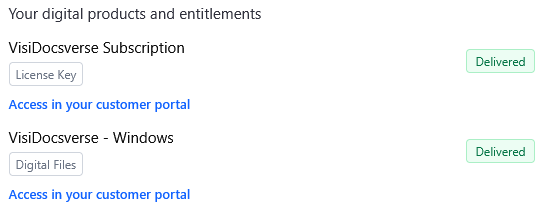
Buying now? After your successful purchase, you will receive two e-mails from Dodo (not in your inbox? Check spam/junk — Dodo's mails land there sometimes). Open the second email — “Your payment to Payment Processor was successful” — and download the installer to your computer (Windows 10/11 PC).
↑ Inside that second Dodo email (“Your payment to Payment Processor was successful”) — click the blue “Access in your customer portal” links: license key on top, installer files below. (Not in your inbox? Check spam/junk.)
2
Double-click the installer and run it past the warning
VisiDocsVerse-Setup.exe
Double-click the downloaded file — Windows will likely flag it as unrecognized — click Show details / More info, then Run anyway. See the walkthrough below.
This warning is typical for independent software — it just means there is no big-tech company license behind the installer, not that anything is wrong with it.
3
Paste your key
When the app first opens, paste the key from that same email and click Activate (online this once). On the trial? Skip this — subscribe when the app asks at day 22, then paste the new key the same way.
◈ Activate Visi|Docsverse
License key (from your purchase email)
Activate online
↑ PASTE YOUR EMAIL KEY HERE
⚠️ Skip the box underneath it (“key file / fully offline”) — that one takes a .json file, not your email key.
THE ONE TRICKY PART · 2 CLICKS
VisiDocsVerse-Setup.exe · system prompt (illustrated)
🛡️
FIRST · WHAT YOU'LL SEE
Your PC flags an unrecognized app
The system holds the installer back because its publisher isn't on file yet. Normal for new independent apps.
Show details ▾(= “More info” on Windows)
Don't run
👆 Click Show details / More info first — the Run option appears after.
Same dialog, expanded. “Unknown publisher” just means no big-company certificate yet — expected for a small indie release.
Run anywayDon't run
Simplified illustration drawn in VisiDocsverse style — not a Windows screenshot. Wording may differ slightly by Windows version. Lost your email? The update banner's Copy receipt search button finds it in seconds. Full detail in the FAQ.
Questions, answered
FAQ
What exactly does VisiDocsverse do with my documents?
It turns each file into a body in a 3D physics space. Documents that share tags, topics, filename concepts or explicit references pull toward each other with spring tethers; heavier documents (more words + references) pull harder. You read any file at the center with everything related orbiting it.
Which formats can I import?
PDF, Word (.docx), Excel (.xlsx/.xls, per-sheet), PowerPoint (.pptx), Markdown, plain text, CSV, video (.mp4/.mov/.webm), audio (.mp3/.wav/.m4a/.ogg), and photos (.jpg/.png/.gif/.webp). Embedded pictures import too, and photographed text is OCR'd locally so it tags, tethers and searches like typed text.
Does it upload my files anywhere?
No. Everything — parsing, OCR, search, storage — runs on your PC. The only network calls are license activation, a weekly license check (with 7-day offline grace), and update notices.
Does VisiDocsverse use AI?
No — deliberately. There is no chatbot, no summarizer, no generative model anywhere in the app. Mapping is deterministic: the same documents always produce the same universe, every link is shared ground you can open and verify, and the interpretation stays yours. That is the point — it is built for people who don't want to outsource their thinking. See Not AI — on purpose.
How is this different from Obsidian / Notion / Zotero?
Those are brilliant filing cabinets. VisiDocsverse is an observatory: instead of lists of names, you get a live map of how your documents relate — ideas as bodies (Thematic), labels as bodies (Tags), plus drag-to-merge tags, passage-pinned notes, and multi-canvas project universes.
Can it manage my references or build my bibliography?
Only a little, and honestly — that's not its job. Where a document carries usable info (a PDF's title, authors, or year), VisiDocsverse will offer a basic APA-style reference you can copy, just as a small courtesy. But it isn't referencing software: no citation library, no cite-while-you-write, no bibliography builder. Think of it as the place you understand your documents — a visual universe for reading and connecting ideas — happily sitting alongside whatever reference manager you already love.
What do I get when I subscribe?
A license key emailed instantly by Dodo Payments — if it's not in your inbox within a minute or two, check spam/junk (their mails land there sometimes). Paste it into the app once to activate — it stays valid while your $4/month subscription (billed $24 twice a year) is active. Every version-1 update is free and arrives with an in-app banner; your existing library and notes are never touched by updates, and your vault files stay readable on your machine, always. Cancel anytime.
How do I install it the first time?
Three steps, about two minutes:
Download the installer.Trying first? Skip the purchase — grab the installer from the Free 21-day trial button on this page and open it; the trial starts automatically, no key needed. Buying now? After your successful purchase, you will receive two e-mails from Dodo (not in your inbox? Check spam/junk — Dodo's mails land there sometimes). Open the second email — “Your payment to Payment Processor was successful” — click the blue “Access in your customer portal” links to reach your key and files, and download the installer to your computer (Windows 10/11 PC).
Double-click the installer and run it past the warning. Double-click the downloaded file. If Windows or your antivirus tries to block the install — no worries — on the warning dialog click More info, then Run anyway.
Paste your key. When the app first opens, the license window appears — paste in the key from that same email and click Activate (it needs the internet this once).
How are updates installed?
Nothing updates itself behind your back. When a new version is released, a small banner appears inside the app, just below the top pill — showing the new version number, the version you have, the release date, and what changed. From there, the whole process is three clicks:
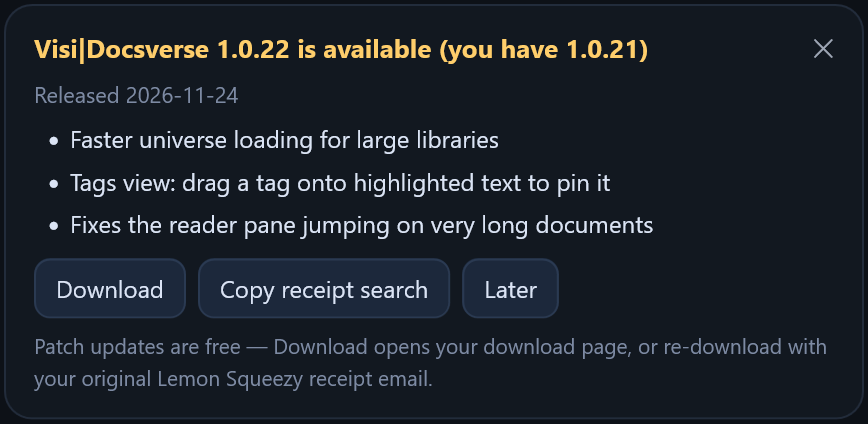
Read the banner. It tells you exactly what's new before you decide anything — e.g. “1.0.22 is available (you have 1.0.21)” followed by the list of changes.
Click Download. This opens your download page, where you grab the new installer and run it. If Windows or your antivirus tries to block the install — no worries — on the warning dialog click More info, then Run anyway. Your library, notes, tags and universes are never touched by updates — everything is exactly where you left it afterwards.
Not now? Click Later (or the ×). The banner goes away and won't nag you about that version again. When the next version comes out, you'll get a fresh banner for that one.
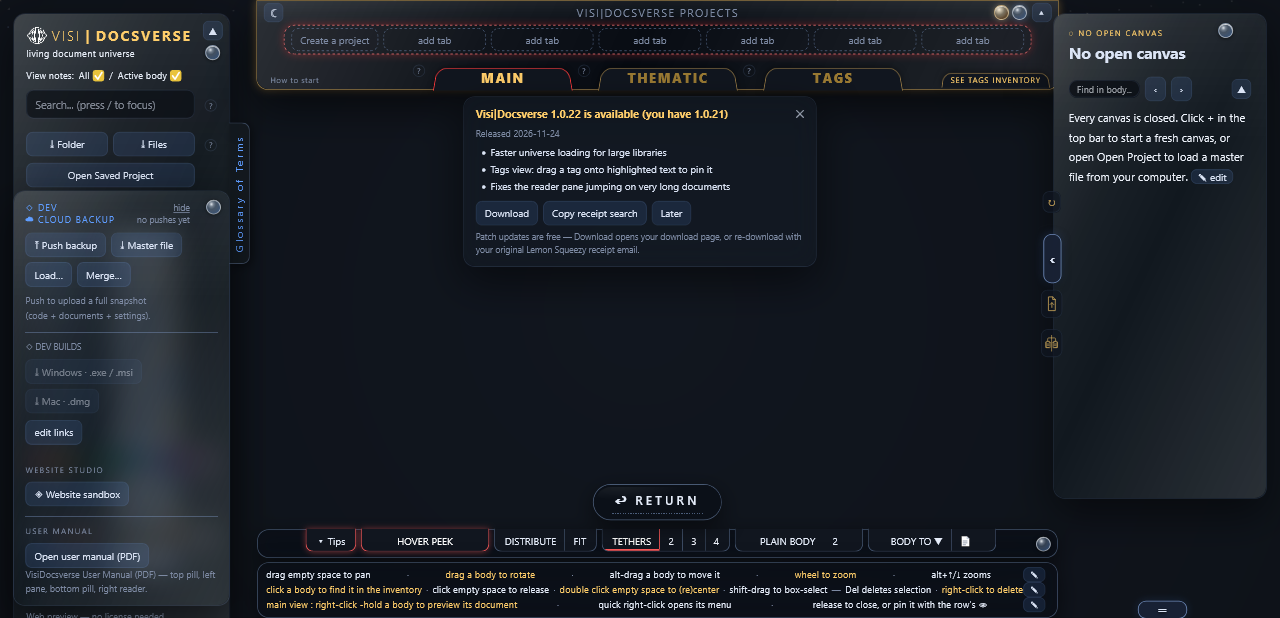
What you'll see: the update banner with the new version, what's in it, and the three buttons.Where it appears: tucked just under the top pill, out of the way of your universe.
Lost your download link? Click Copy receipt search in the banner — it copies a search phrase that finds your original Dodo Payments receipt email in seconds, and that email always holds your free re-download. Updates are included while you're subscribed, and nothing ever installs without you clicking Download.
What if I have hundreds of files?
That's the point. Box-select, fit-to-screen, distribute-into-orb map mode, per-canvas universes, and the verse-map minimap keep big collections navigable. Mass-ranked seating means the heavyweights anchor the center automatically.
Which computers does it run on?
VisiDocsverse is a Windows app (Windows 10 and 11). Mac and Linux versions are coming soon — same universe, same offline-first promise. If you're on a Mac or Linux machine and want to be told the moment your version lands, send us a message below and we'll put you on the list.
Do I lose my library if I cancel?
No — never. Your documents, notes, tags and universes live in your own vault files on your own machine, in readable formats, and they stay exactly where they are whether you subscribe or not. Canceling only stops future updates and license checks; nothing is locked, held, or taken away. The same holds when a free trial ends: the vault stays readable, only adding new material pauses until you subscribe.
Who can see my documents?
Nobody but you. There is no account, no cloud sync, no analytics looking over your shoulder — your files never leave your PC, so theses, client files, manuscripts and field notes stay as private as the machine they're on. The only conversations the app ever has with the outside world are license activation, a weekly license check, and update notices.
Does importing move or change my originals?
No — importing only reads. Your PDFs, Word files, photos and everything else stay exactly where they are, exactly as they were. VisiDocsverse keeps its own working copies in its vault, so your filing system is never rearranged, renamed, or touched.
How do I back up, or move to a new computer?
Your whole library lives in portable vault files, so backing up is just copying them somewhere safe — and moving machines means copying them over and activating there. Your license moves with you: your key covers up to two Windows machines at a time — just activate on each with the same key. If both seats are already in use and you move to a new machine, deactivate on one of the old ones first, then activate on the new one. As many moves as life requires.
Is there a free trial?
Yes — 21 days, the full app, no card. Download the installer and open it: the trial starts automatically on first launch (it works offline, like everything else). When the 21 days end, the app asks you to subscribe — adding documents, notes and canvases pauses until you do, but your vault stays readable either way: browse, search, read, export and back up anything, any time. Subscribe from the app or right here on this page, paste the emailed key once (check spam/junk if you can't find it — Dodo's mails land there sometimes), and everything carries on where the trial left off.
How do I cancel my subscription?
Open the Dodo Payments customer portal, sign in with the email address you bought with, and cancel under Subscriptions — it takes a minute. (The portal link is also in every Dodo Payments receipt email — check spam/junk if you can't find one.) Cancelling stops future renewals; your app keeps working until the end of the period you've paid for. No messages to us needed, no retention maze.
Contact
Talk to a human.
📬 Support & billing
For billing, invoices, or canceling a subscription: open the Dodo Payments customer portal (sign in with your purchase email — the portal link is also in every Dodo Payments receipt email; check spam/junk if one ever seems missing) and manage everything from there.
For other queries, or if you wish to buy for a team or institution: send us a message here and we'll get back to you as quickly as we can.
Stop filing. Start flying.
Your library is already a universe. Come see it.
Join the researchers, writers and analysts who read at the center of gravity.